Hack Your Mind Right Now....!

  • Home
  • Android
  • C Language
  • Facebook Hacking
    • 20 FB Tricks
    • Animation in FB
  • DeadlyHacker

GET SET READY......Go

  • Mr. DeadlyHacker
    more
  • Window Hacking
    more
  • Hacking Tools
    more
  • Google Hacking
    more
Showing posts with label Facebook Tips. Show all posts
12:00 PM

How Facebook is blocked in the latest 2013 (updated)

Geek today will guide the way on Facebook in 2013 are being blocked. As is well known the VN network is actively blocking Facebook for geek however, the firewalls on Facebook is not too difficult. There are 3 ways in which Facebook is very simple to use that you use Hotspot Shield software, edit the Host file and use add-on for Firefox AnonymoX

1. Hotspot Shield by going to Facebook
Hotspot Shield is a free VPN client program. It connects us with a computer virtual private network and the data is encrypted to ensure security. The computer will use one of U.S. IP to connect to the network at the speed does not change as not using Hotspot Shield. If you use free of facing a less advertisements. Download here http://hotspotshield.com/


The advantage of the method is fast pace on facebook can upload images comfortable, but the downside is you have to be a little advertising.

2. How to edit the hosts file by Facebook
Step 1: Open the folder C: \ WINDOWS \ system32 \ drivers \ etc

The fastest way is open press Windows + R and then copy paste the line C: \ WINDOWS \ system32 \ drivers \ etc into the box and hit Enter


Step 2: Open the hosts file in a folder by Right Click select Open with , then select ChooseNotepad . Or D ouble-click on it and then select Notepad


Step 3: Copy and paste this code added to the end of the line in the hosts file. Save the hosts file.That's it from here as soon as you open your browser on facebook but could not worry anymore


Note:

- You must have administrator (admin) can edit or copy the host file. If you do not have administrator rights, then there is no way to edit the hosts file facebook by both

- Despite administrator but sometimes Windows does not allow you to edit the hosts file or overwrite. In this case you follow these steps
Create folders bak file in the directory containing the host C: \ WINDOWS \ system32 \ drivers \ etc (illustrated above)
Move the file hosts in folder bak
Download the hosts file is available here >> HHV create links (last updated)
Copy the downloaded hosts file to the folder C: \ WINDOWS \ system32 \ drivers \ etc

The advantage of this method is fast paced, but advertising must not be updated frequently and sometimes hosts not upload images.

3. How to Facebook in AnonymoX for Firefox

Step 1: Download and install AnonymoX

Click here to install AnonymoX Add-on for Firefox, go to the following link:
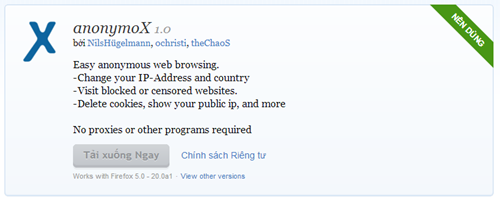


Click on the button + Add to Firefox to install AnonymoX. Wait Firefox download window will appear after completion.
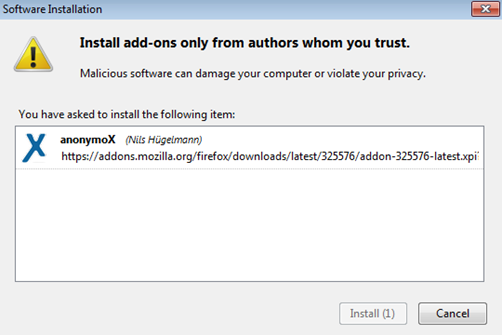


Click Install Now to install. Then restart Firefox to start using AnonymoX on Facebook

Step 2: Install custom

Need to tweak a bit to on facebook without affecting the speed of the other sites.

After installing AnonymoX in the lower right corner will have the words " Standard | off ... IP: .... " red. Click the following table will show:
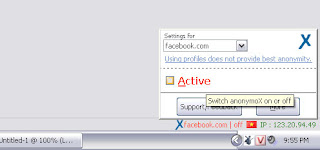


Menu Settings you chose for facebook.com and click to select Active . Red text will turn green.
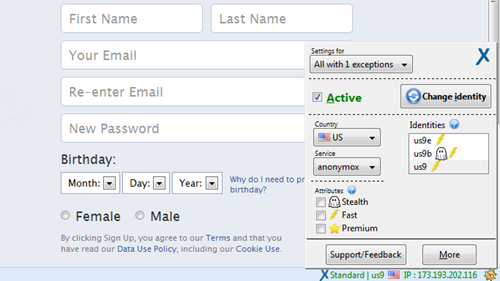


The special custom AnonymoX allow Firefox on facebook with an IP in the U.S.. Normally AnonymoX will automatically switch to IP Vietnam. This tweak does not affect the page loading speed normal but still you on facebook guarantee 100% success.

Note: when U.S. IP is defective or not in facebook, you click Change Identity to change to a different IP.

Pros on facebook user when using the Add-on AnonymoX is very stable, not regularly update the hosts file. Used this way can also upload photos to Facebook in a normal way.

So with 3 simple tips on within 30 seconds as you can on facebook fastly despite how many layers are blocked by the firewall go again!

Vi Hoa Hong - Incineration

Thank you Incineration ( DeadlyHacker Blog ) have collaborated to com
plete this article.
3:23 PM

How to send 1GB file via facebook to your friends - Facebook Pipe


Here we comes with a new facebook app called Pipe that lets you to allow send files between Facebook friends, up to 1GB. Pipe is a peer-to-peer file sharing app for Facebook and it set to launch for today.
Until now, facebook have lack of file transfer features but from now using Facebook Pipe app make a lot easier to send documents, photos, videos etc with your facebook friends.


facebook pipeline
To send files using Pipe, all you have to do is, just drag and drop your files on Pipe and your friends will receive it. This works on peer-to-peer means file passes directly from computer to computer, with no server in between.


11:35 PM

How to organize your Facebook friends in Lists

Google+ made it dead simple to organize contacts into Circles, and Facebook has followed suit with its revised Lists feature. Learn how to easily organize your friends into groups.


Facebook recently revised its Lists feature to make it much easier to organize your friends into groups like Family, Colleagues, Close Friends, and so on. Some are automatically populated based on associations and algorithms known only to FB techies, while others require a bit of manual effort to fill up. It's not so much work, and it's well worth it. Here's how to get going:

First, you need to check to see if lists have shown up on your FB page yet. If not, you may want to wait a day or two, as the rollout isn't quite complete yet.) It's easy--just check over on the left sidebar under the Favorites section.
Click More next to Lists to bring up the main Lists page. You should see Close Friends and Acquaintances at the top; these are the two lists that you have to fill up manually. The rest are populated automatically, but you can add or subtract friends from each list if you like. 


Step 2: Bring up Lists main page.
Let's start with Close Friends. Click its name to bring up a new page that lets you add friends to the list and update your status so that only friends on the list can see it. Suggestions are on the right and easy to add, but you can add anyone you want by typing their names into the box up top or heading over to you main Friends list and adding them manually. The Acquaintances list works the same way. 


Step 3: Close Friends list.
It's a good idea to check out the prepopulated lists, too--often they are incomplete, and there can be some funny (or not so funny) additions. Click any list to get started; most lists should be pretty well stocked. My example is a large volunteer organization in which only staff members were automatically added. There are quite a few volunteers suggested, and it's easy to add them all in pretty quickly.


Step 4: Pre-populated list.
Once your lists are locked in, you should be good until you add new friends. Make adding them to lists the first thing you do and you should find that it becomes second nature. Of course, if you're colleagues or classmates, they should already be added to those lists as soon as they confirm.
If you want to send out an update to a list, just click it and start typing in the text box. You can also limit your feed to one list or skip around freely. From the main FB page, any update can be limited to a particular list easily; just click Public under the text box and select a list. 


Step 6: Update to list.
There you have it. Not quite as brainlessly easy as Google+, but still pretty simple and easy for most of us to use.
5:09 PM

How to Increase Facebook Fan page Likes

                      To Increase your Like Visit this Website

Site : To Increase your Like Visit this Website
Looking for hundreds of thousands of Facebook Likes? Your search stops here. Get Likes to your Facebook Pages and Sites by real people quickly and consistently simply via Like Exchange.
Promote your website and your business by steadily increasing your Facebook Likes. Join Get Likes Facebook today for free!
Read also : How to Get More Email Subscribers for your Blog
How it Works
Like Exchange is the ultimate fan page discovery tool. No longer will you have to buy Facebook fans.
they provide you with the fastest, easiest way to get more Facebook fans.
The concept is simple: I like your fan page, and you like mine.
The more fan pages you like, the more your fan pages will be liked.
Click Below
To Increase your Like Visit this Website
5:04 PM

Facebook Recommendation plugin box Error "Invalid action type" Fixed

When Timeline of Facebook introduce, very good new things introduced like cover photo all links and information is visible in unique way never seen before in any social networking website. But Facebook timeline is cool but some people doesn’t want timeline but you can make it very cool than earlier facebook profile first you have to put cover photo for your timeline then you can set a cool profile picture which reflect you cover photos.

Here is some websites from where you can download Timeline Covers

My Profile Cover
Cover Photo Finder
FB Profile Covers
My FB Covers
In all these websites there are thousands of timeline cover images you can download it for free , You can download images for any occasions like marriage, Christmas Valentine’s dayetc

You can create your own Timeline Covers like this.


4:54 PM

Receive Free Updates from Facebook Fan Page Via SMS

Facebook Fan Page is the Best feature for Business and Brands, and thousands of people like these pages, and Now you can get regular alerts from your favorite fan page via SMS.

First Visit a Fan Page, I am showing you the example of My blog’s Fan page.

Open any Photo or Image from the album on the fan page.


You will see a URL like this Now Copy the Fan page ID you can see in the Red rectangle.
Now we need Atom Feed URL of your Fan page you can get your Fan Page Atom Feed by following URL

https://www.facebook.com/feeds/page.php?format=atom10&id=138140976201817

Red Color Indicate the ID of your Fan page replace it with your Fan page, now you have your Atom Feed of your Facebook fan Page.

After Getting Atom Feed URL then Visit Google SMS Channels

If you are visiting first time then you have to verify your Cell phone Number.

After entering the Phone number click Send verification code , then you will receive a Verification code on your cell phone verify the code and then create your own channel.


Create a new Channel by clicking Try Now Link in the Right Side of the page.
Now fill your New SMS channel Details


You have to fill all required details for your Channel, set a unique name for your channel, you can add a short description, and fill all details as per your choice but in source field select RSS/Atom Feed and Enter the Feed URL of Mashable.com or any other website, select which type of content you want via SMS, SMS can’t be more than 160 words so if you are selecting titles and Body both it will deliver title and some part of the Article or news body. Then agree the Terms and Service and Click on Create Channel button.

Now you wil
l be able to receive updates from Fan page, I hope you will like this tutorial.
4:52 PM

How to delete All Facebook messages in One Click


Facebook is the fastest growing community in the world and it becomes the number one social networking website, and we all have many friends and we always chat with them but its very time consuming to delete chat logs, chat logs are saved in your Facebook messages sections all chat history saved there many people likes to save the history and many wants to delete it. But when you try to delete all conversation one by one it will take time and to reduce this effort you can use a Chrome extension by which you can delete all Facebook conversation with one click, this extension creates a delete all button by which you can delete all messages from your Facebook Logs, its very easy and Simple.


Step 1
Go to the Extension Page and add this extension to chrome


Step 2
You will be asked for the confirmation of the Installation of extension click on Add Button.


It’s Done.
Now open your Facebook and login with your credentials and when you click on messages you will see the delete all button on the top by which you can delete all conversation with one click in no time.


I hope you will like this Trick to delete all Facebook messages without wasting time.
Home Older Posts
Subscribe to: Posts (Atom)

Like Me On Facebook Mr. Deadly Hacker

About The Author

Unknown
View my complete profile
Aman Badhania writes this blog to help computer users with problems related to web services and getting the most out of their own websites.
Feel The Power Of Cyber Hacking Mr. DeadlyHacker

Popular

    no image Reverse Engineering
    (no title) (no title)
    How to upload animated gif images On facebook How to upload animated gif images On facebook
    HOW TO SHUTDOWN SCHOOL , NETCAFE , UNIVERSITY , LAB'S COMPUTERS REMOTELY HOW TO SHUTDOWN SCHOOL , NETCAFE , UNIVERSITY , LAB'S COMPUTERS REMOTELY
    no image Mobile Bluetooth Hacking:
    no image Unattended Installation of XP:
    KJ 2013 Permanent Activator For All Windows and Office 100% Working KJ 2013 Permanent Activator For All Windows and Office 100% Working

TemplateHits

  • Home
  • About Me
  • Serial Keys 1million
  • Password Hacking
  • Telnet
  • Hacking
  • Download
  • C Language Tips and Trick
Feel The Power Of Cyber Hacking Mr. DeadlyHacker

Categories

  • Hacked Window
  • Android
  • Google Hacking
  • Hacking Tools
  • Game
  • Window Software
  • Android Tips
  • Window 8
  • Software
  • Facebook Hacking
  • Firefox Imp. Addons
  • Window Tips
  • Android Apps
  • Computer Hacking
  • Google Tips
  • How To Make Window Genuiene
  • Networking certifications
  • Android Hack
  • AntiVirus Hack
  • Facbook hack
  • Mobile Hacking Tools
  • Aman Badhania
  • Deadly Hacker
  • Desktop Hacking
  • Google Info
  • Google Project
  • LFI and RFI
  • Proxy Server
  • Blogger Tips
  • Crash Computer
  • Cross Site Scripting (XSS)
  • Exploits
  • IP Tips
  • USB Hacking
  • Batch Programming
  • CRIMINAL HACKED
  • Computer trick
  • Email Hacking
  • Internet Tricks
  • Keylogger
  • System Hacking
  • Assassin’s Creed III
  • C#
  • IGI 2013
  • Recover Deleted Files

Hacking Tricks

Hacked Window Hacking Tools Window Software Window 8 Window Tips How To Make Window Genuiene Window 7 Hacking tutorial IP Tips Internet USB Hacking Hardware IGI 3 Internet Tricks Torrent HD movie HTML Hacker Types Hacking Game Hacking Tips Happy Deepawali Hard Disk Hardware Hacking HitMan Game HoneyPot Hosting IGI 2013 Image 2 Text Information Intrusion Detection System (IDS) Tekken 6 Telnet Terminator RAT TrueCaller UserName VLC Player Hacking Virus Visual Script Tricks Window 10 Window 8 Hack Window 9 Window News Window Server Youtube Tips Zombie iPhone

Crack Skull

Crack Skull
Shiiiiiiiiiiiiiiii.....Don't Live This

Followers

Deadly Tricks

Android Android Tips Android Apps Android Hack AntiVirus Hack Aman Badhania About Keylogging Backtrack Blogger Tips Backup Trick Batch Programming Browser APT Access Block Sites Advance Persistant Threat Albert Einstein Android Code Android Games Android Smart Phone Angry birds Application Assassin’s Creed III AutoCad Batch Hacking Blogger tools Bolloywood Movie HD
Facebook Hacking Firefox Imp. Addons Facebook Tips Download Facbook hack Deadly Hacker Desktop Hacking Exploits Email Hacking Data Recovery Desktop Apps Disable Mouse Dos Tools Drawing Arts Drive Icon Change Ethical Hacking Learn File hosting Firefox Download Flash Software

More Tricks

Software Proxy Server Password Hacking Software hacking Opreting System Partition Make Programming Of linux Remix Hacking Reverse Engineering Samsung Mobile Hacking Skin Pack For Window 7 System Hacking Open Source Code PC Hack PenDrive Bootable PenDrive Hacking Phishing Attacks Phreaking Proxy Sites RainMeters Recover Recover Deleted Files Red Hat Registry Hack Reinstall Your All Drivers In 5 MinutesThis is a featured page Resume Spear Phishing
Computer Hacking Backtrack Blogger Tips Command Hacking Crash Computer Cross Site Scripting (XSS) Backup Trick Batch Programming Browser CRIMINAL HACKED Computer trick Batch Hacking Blogger tools Bolloywood Movie HD C# CSS Check Password Coin Box Calling Hacking Cryptography
Aman Badhania
Copyright © 2012 Hack Your Mind Right Now....! - and Deadly Hacker.