Hack Your Mind Right Now....!

  • Home
  • Android
  • C Language
  • Facebook Hacking
    • 20 FB Tricks
    • Animation in FB
  • DeadlyHacker

GET SET READY......Go

  • Mr. DeadlyHacker
    more
  • Window Hacking
    more
  • Hacking Tools
    more
  • Google Hacking
    more
Showing posts with label Facbook hack. Show all posts
12:00 PM

How Facebook is blocked in the latest 2013 (updated)

Geek today will guide the way on Facebook in 2013 are being blocked. As is well known the VN network is actively blocking Facebook for geek however, the firewalls on Facebook is not too difficult. There are 3 ways in which Facebook is very simple to use that you use Hotspot Shield software, edit the Host file and use add-on for Firefox AnonymoX

1. Hotspot Shield by going to Facebook
Hotspot Shield is a free VPN client program. It connects us with a computer virtual private network and the data is encrypted to ensure security. The computer will use one of U.S. IP to connect to the network at the speed does not change as not using Hotspot Shield. If you use free of facing a less advertisements. Download here http://hotspotshield.com/


The advantage of the method is fast pace on facebook can upload images comfortable, but the downside is you have to be a little advertising.

2. How to edit the hosts file by Facebook
Step 1: Open the folder C: \ WINDOWS \ system32 \ drivers \ etc

The fastest way is open press Windows + R and then copy paste the line C: \ WINDOWS \ system32 \ drivers \ etc into the box and hit Enter


Step 2: Open the hosts file in a folder by Right Click select Open with , then select ChooseNotepad . Or D ouble-click on it and then select Notepad


Step 3: Copy and paste this code added to the end of the line in the hosts file. Save the hosts file.That's it from here as soon as you open your browser on facebook but could not worry anymore


Note:

- You must have administrator (admin) can edit or copy the host file. If you do not have administrator rights, then there is no way to edit the hosts file facebook by both

- Despite administrator but sometimes Windows does not allow you to edit the hosts file or overwrite. In this case you follow these steps
Create folders bak file in the directory containing the host C: \ WINDOWS \ system32 \ drivers \ etc (illustrated above)
Move the file hosts in folder bak
Download the hosts file is available here >> HHV create links (last updated)
Copy the downloaded hosts file to the folder C: \ WINDOWS \ system32 \ drivers \ etc

The advantage of this method is fast paced, but advertising must not be updated frequently and sometimes hosts not upload images.

3. How to Facebook in AnonymoX for Firefox

Step 1: Download and install AnonymoX

Click here to install AnonymoX Add-on for Firefox, go to the following link:
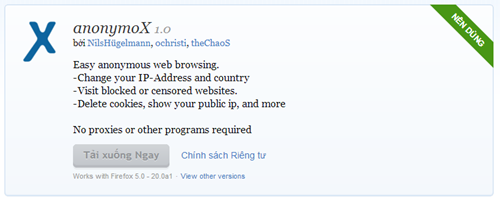


Click on the button + Add to Firefox to install AnonymoX. Wait Firefox download window will appear after completion.
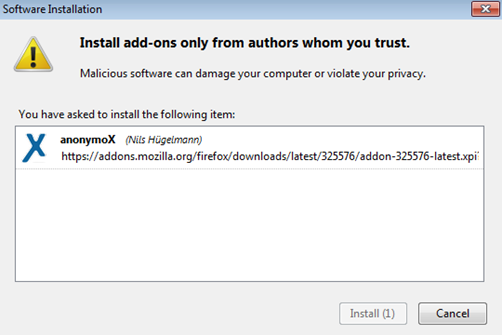


Click Install Now to install. Then restart Firefox to start using AnonymoX on Facebook

Step 2: Install custom

Need to tweak a bit to on facebook without affecting the speed of the other sites.

After installing AnonymoX in the lower right corner will have the words " Standard | off ... IP: .... " red. Click the following table will show:
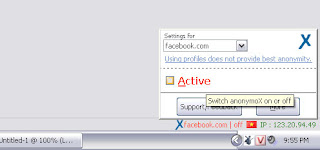


Menu Settings you chose for facebook.com and click to select Active . Red text will turn green.
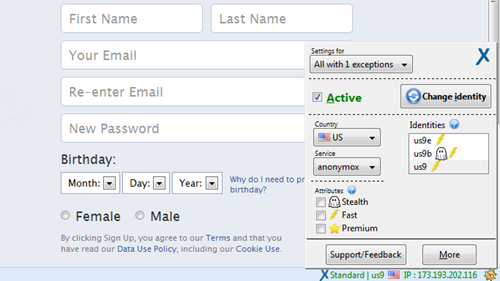


The special custom AnonymoX allow Firefox on facebook with an IP in the U.S.. Normally AnonymoX will automatically switch to IP Vietnam. This tweak does not affect the page loading speed normal but still you on facebook guarantee 100% success.

Note: when U.S. IP is defective or not in facebook, you click Change Identity to change to a different IP.

Pros on facebook user when using the Add-on AnonymoX is very stable, not regularly update the hosts file. Used this way can also upload photos to Facebook in a normal way.

So with 3 simple tips on within 30 seconds as you can on facebook fastly despite how many layers are blocked by the firewall go again!

Vi Hoa Hong - Incineration

Thank you Incineration ( DeadlyHacker Blog ) have collaborated to com
plete this article.
11:35 PM

How to organize your Facebook friends in Lists

Google+ made it dead simple to organize contacts into Circles, and Facebook has followed suit with its revised Lists feature. Learn how to easily organize your friends into groups.


Facebook recently revised its Lists feature to make it much easier to organize your friends into groups like Family, Colleagues, Close Friends, and so on. Some are automatically populated based on associations and algorithms known only to FB techies, while others require a bit of manual effort to fill up. It's not so much work, and it's well worth it. Here's how to get going:

First, you need to check to see if lists have shown up on your FB page yet. If not, you may want to wait a day or two, as the rollout isn't quite complete yet.) It's easy--just check over on the left sidebar under the Favorites section.
Click More next to Lists to bring up the main Lists page. You should see Close Friends and Acquaintances at the top; these are the two lists that you have to fill up manually. The rest are populated automatically, but you can add or subtract friends from each list if you like. 


Step 2: Bring up Lists main page.
Let's start with Close Friends. Click its name to bring up a new page that lets you add friends to the list and update your status so that only friends on the list can see it. Suggestions are on the right and easy to add, but you can add anyone you want by typing their names into the box up top or heading over to you main Friends list and adding them manually. The Acquaintances list works the same way. 


Step 3: Close Friends list.
It's a good idea to check out the prepopulated lists, too--often they are incomplete, and there can be some funny (or not so funny) additions. Click any list to get started; most lists should be pretty well stocked. My example is a large volunteer organization in which only staff members were automatically added. There are quite a few volunteers suggested, and it's easy to add them all in pretty quickly.


Step 4: Pre-populated list.
Once your lists are locked in, you should be good until you add new friends. Make adding them to lists the first thing you do and you should find that it becomes second nature. Of course, if you're colleagues or classmates, they should already be added to those lists as soon as they confirm.
If you want to send out an update to a list, just click it and start typing in the text box. You can also limit your feed to one list or skip around freely. From the main FB page, any update can be limited to a particular list easily; just click Public under the text box and select a list. 


Step 6: Update to list.
There you have it. Not quite as brainlessly easy as Google+, but still pretty simple and easy for most of us to use.
4:52 PM

How to delete All Facebook messages in One Click


Facebook is the fastest growing community in the world and it becomes the number one social networking website, and we all have many friends and we always chat with them but its very time consuming to delete chat logs, chat logs are saved in your Facebook messages sections all chat history saved there many people likes to save the history and many wants to delete it. But when you try to delete all conversation one by one it will take time and to reduce this effort you can use a Chrome extension by which you can delete all Facebook conversation with one click, this extension creates a delete all button by which you can delete all messages from your Facebook Logs, its very easy and Simple.


Step 1
Go to the Extension Page and add this extension to chrome


Step 2
You will be asked for the confirmation of the Installation of extension click on Add Button.


It’s Done.
Now open your Facebook and login with your credentials and when you click on messages you will see the delete all button on the top by which you can delete all conversation with one click in no time.


I hope you will like this Trick to delete all Facebook messages without wasting time.
4:35 PM

20 Facebook Best Tricks Collection


20 Facebook Tips/Tricks You Might Not Know

facebook tips & tricks
If you surf Facebook on daily basis or occasionally, chances are you’re already familiar with regular stuffs like add/delete friends, update statuses, walls and profile, add and explore pages & applications, etc, but there’s more..
This week we want to cover some interesting things you can do on (or with) Facebook; inclusive of tricks that are not documented or unknown to many, as well as tips to stay connected better with your friends. Without further ado, here’s 20 Facebook Tips/Tricks You Might Not Know. If you have interesting tips/tricks related to Facebook, please feel free to share in the comment box below.
  1. How To Place Facebook Chat On Firefox Sidebar

    If you are using Firefox, you can place the Facebook Chat at the sidebar.
    Facebook_Chat_Firefox_Sidebar
  2. How To Download Facebook Photo Albums

    FacePAD: Facebook Photo Album Downloader allows you to download your friends’ facebook albums, Events albums, and Group Albums, en masse, with the click of a button.
    facepad
  3. How To Share Flickr Photos To Facebook

    Flickr2Facebook is an unofficial Flickr to Facebook uploader(bookmarklet) which allows you upload photos to Facebook from Flickr.
    flickr2facebook
  4. How To Update Facebook Without Using Facebook

    hellotxt and Ping.fm both introduced features that let Facebook administrators update Facebook Pages.
    hellotxt
  5. How To Schedule Facebook Messages

    Sendible lets you schedule Facebook messages ahead of time so you can send messages to your friends, customers or colleagues in the future.
    sendible
  6. How To "Friend" Someone On Facebook & Hide It From Your Status Updates

    A short tutorial on Makeuseof to guide you how to hide Facebook status updates and keep that fact confined to your closer friends.
  7. How To Create A Photo Collage Using Pictures Of Your Facebook Friends

    Click on Friends tab. Proceed to More tab. From "Choose an option" dropdown, choose any of the dashes "—" . Your Facebook friends collage is right on your computer screen.
    photo_collage
  8. How To Know When Facebook Friends Secretly Delete Or Block You

    This service has been discontinued. X-Friends is a unique tool for tracking friends that disappear from Facebook.
    X-friends
  9. How To Display Selected Pictures Only On Your Facebook Profile Page

    A little-known feature in Facebook that lets you decide who shows up in that Friends box. Click that "edit" pencil in your Friends box and type the names of your best friends in the box that says "Always show these friends"
    friend_photos
  10. How To Remove Facebook Advertisements

    This Greasemonkey script – Facebook: Cleaner removes many of the annoying ads and updates that unavoidably appear on your Facebook pages.
    ads
  11. How To Syncs Photos Of Facebook Friends With Contacts In Microsoft Outlook

    OutSync is a free Windows application that syncs photos of your Facebook friends with matching contacts in Microsoft Outlook. It allows you to select which contacts are updated. So you can update all contacts at once or just a few at a time.
    outsync
  12. How To Display Facebook Statuses On WordPress Blog

    The following method make use of Facebook status feed and WordPress RSS widget to display Facebook Statuses on WordPress blog.. It will also work for self-host WordPress blogs.
    statuses
  13. How To Post Your Blog Posts To Your Facebook Wall Automatically

    Wordbook allows you to cross-post your blog posts to your Facebook Wall. Your Facebook “Boxes” tab will show your most recent blog posts.
    wordbook
  14. How To Access Facebook Chat On Desktop

    Gabtastik and digsby let you keep Facebook chat sessions open on your Windows desktop outside of your regular web browser, using minimal screen real estate and system memory.
  15. How To Create Quiz On Facebook Easily

    LOLapps provides quiz creator that can be employed to conjure up these popular personality quizzes that are so widespread in Facebook.
    lolapps
  16. How To Hide Your Online Status On Facebook Chat From Select Contacts

    Facebook has integrated friends list with Chat and you can also choose which of these list members get to see you online.
    hide
  17. How To Get Facebook Updates On Email

    NutshellMail consolidates your Facebook accounts through the inbox you use the most.
    nutshellmail
  18. How To Update Facebook Status From Firefox

    FireStatus is a status update utility for multiple social networks, including FaceBook.
    firestatus
  19. How To Get Facebook On Your Desktop

    Seesmic Desktop, Facebooker, Xobni, Facebook Sidebar Gadget, Scrapboy and Facebook AIR application are desktop applications that allows you interact with your stream just as you would on Facebook, but without the browser.
  20. How To Delete, Cancel And Terminate Facebook Account And Profile

    A simple guide to terminate, delete or cancel Facebook account, together with the Facebook profile easily.
    terminate

3:25 PM

FIND PASSWORDS BEHIND THE STARS("*" asterisk)

FIND PASSWORDS BEHIND THE STARS
Ever wanted toknow whatis behind those ********passwords. For example if you want to know password from facebook account that somebody else have typed and left it. Here is post which will help you. .1)Howto breakhiddenpasswords******** in firefoxThis is simple. Just copy and paste the followingjavascript codewhen in your address bar whenever you are on a site with a login form and it will display the password behind ****** right away.

COPY THE CODE AND PASTE IT INTO ADDRESS BAR
 

Enter email address where you want to receive tutorials when we post them! It’s free!
Download the java script in txt File download It and copy paste it..
hackpasswordtricks.txt    Download

Home Older Posts
Subscribe to: Posts (Atom)

Like Me On Facebook Mr. Deadly Hacker

About The Author

Unknown
View my complete profile
Aman Badhania writes this blog to help computer users with problems related to web services and getting the most out of their own websites.
Feel The Power Of Cyber Hacking Mr. DeadlyHacker

Popular

    no image Reverse Engineering
    (no title) (no title)
    How to upload animated gif images On facebook How to upload animated gif images On facebook
    HOW TO SHUTDOWN SCHOOL , NETCAFE , UNIVERSITY , LAB'S COMPUTERS REMOTELY HOW TO SHUTDOWN SCHOOL , NETCAFE , UNIVERSITY , LAB'S COMPUTERS REMOTELY
    no image Mobile Bluetooth Hacking:
    no image Unattended Installation of XP:
    KJ 2013 Permanent Activator For All Windows and Office 100% Working KJ 2013 Permanent Activator For All Windows and Office 100% Working

TemplateHits

  • Home
  • About Me
  • Serial Keys 1million
  • Password Hacking
  • Telnet
  • Hacking
  • Download
  • C Language Tips and Trick
Feel The Power Of Cyber Hacking Mr. DeadlyHacker

Categories

  • Hacked Window
  • Android
  • Google Hacking
  • Hacking Tools
  • Game
  • Window Software
  • Android Tips
  • Window 8
  • Software
  • Facebook Hacking
  • Firefox Imp. Addons
  • Window Tips
  • Android Apps
  • Computer Hacking
  • Google Tips
  • How To Make Window Genuiene
  • Networking certifications
  • Android Hack
  • AntiVirus Hack
  • Facbook hack
  • Mobile Hacking Tools
  • Aman Badhania
  • Deadly Hacker
  • Desktop Hacking
  • Google Info
  • Google Project
  • LFI and RFI
  • Proxy Server
  • Blogger Tips
  • Crash Computer
  • Cross Site Scripting (XSS)
  • Exploits
  • IP Tips
  • USB Hacking
  • Batch Programming
  • CRIMINAL HACKED
  • Computer trick
  • Email Hacking
  • Internet Tricks
  • Keylogger
  • System Hacking
  • Assassin’s Creed III
  • C#
  • IGI 2013
  • Recover Deleted Files

Hacking Tricks

Hacked Window Hacking Tools Window Software Window 8 Window Tips How To Make Window Genuiene Window 7 Hacking tutorial IP Tips Internet USB Hacking Hardware IGI 3 Internet Tricks Torrent HD movie HTML Hacker Types Hacking Game Hacking Tips Happy Deepawali Hard Disk Hardware Hacking HitMan Game HoneyPot Hosting IGI 2013 Image 2 Text Information Intrusion Detection System (IDS) Tekken 6 Telnet Terminator RAT TrueCaller UserName VLC Player Hacking Virus Visual Script Tricks Window 10 Window 8 Hack Window 9 Window News Window Server Youtube Tips Zombie iPhone

Crack Skull

Crack Skull
Shiiiiiiiiiiiiiiii.....Don't Live This

Followers

Deadly Tricks

Android Android Tips Android Apps Android Hack AntiVirus Hack Aman Badhania About Keylogging Backtrack Blogger Tips Backup Trick Batch Programming Browser APT Access Block Sites Advance Persistant Threat Albert Einstein Android Code Android Games Android Smart Phone Angry birds Application Assassin’s Creed III AutoCad Batch Hacking Blogger tools Bolloywood Movie HD
Facebook Hacking Firefox Imp. Addons Facebook Tips Download Facbook hack Deadly Hacker Desktop Hacking Exploits Email Hacking Data Recovery Desktop Apps Disable Mouse Dos Tools Drawing Arts Drive Icon Change Ethical Hacking Learn File hosting Firefox Download Flash Software

More Tricks

Software Proxy Server Password Hacking Software hacking Opreting System Partition Make Programming Of linux Remix Hacking Reverse Engineering Samsung Mobile Hacking Skin Pack For Window 7 System Hacking Open Source Code PC Hack PenDrive Bootable PenDrive Hacking Phishing Attacks Phreaking Proxy Sites RainMeters Recover Recover Deleted Files Red Hat Registry Hack Reinstall Your All Drivers In 5 MinutesThis is a featured page Resume Spear Phishing
Computer Hacking Backtrack Blogger Tips Command Hacking Crash Computer Cross Site Scripting (XSS) Backup Trick Batch Programming Browser CRIMINAL HACKED Computer trick Batch Hacking Blogger tools Bolloywood Movie HD C# CSS Check Password Coin Box Calling Hacking Cryptography
Aman Badhania
Copyright © 2012 Hack Your Mind Right Now....! - and Deadly Hacker.